For print shops · Para sa mga print shop

Know your true cost. Price every print job with confidence.

PrintBoss Costing is a free Windows app that works out the exact selling price of tarpaulins, stickers, mugs, photo prints and more, from your real materials, ink, electricity and labor.

Windows 10 or 1193 MBWorks offlineNo account needed

Questions? Call or text Jen Carlo Maglaque: 0975 813 1700

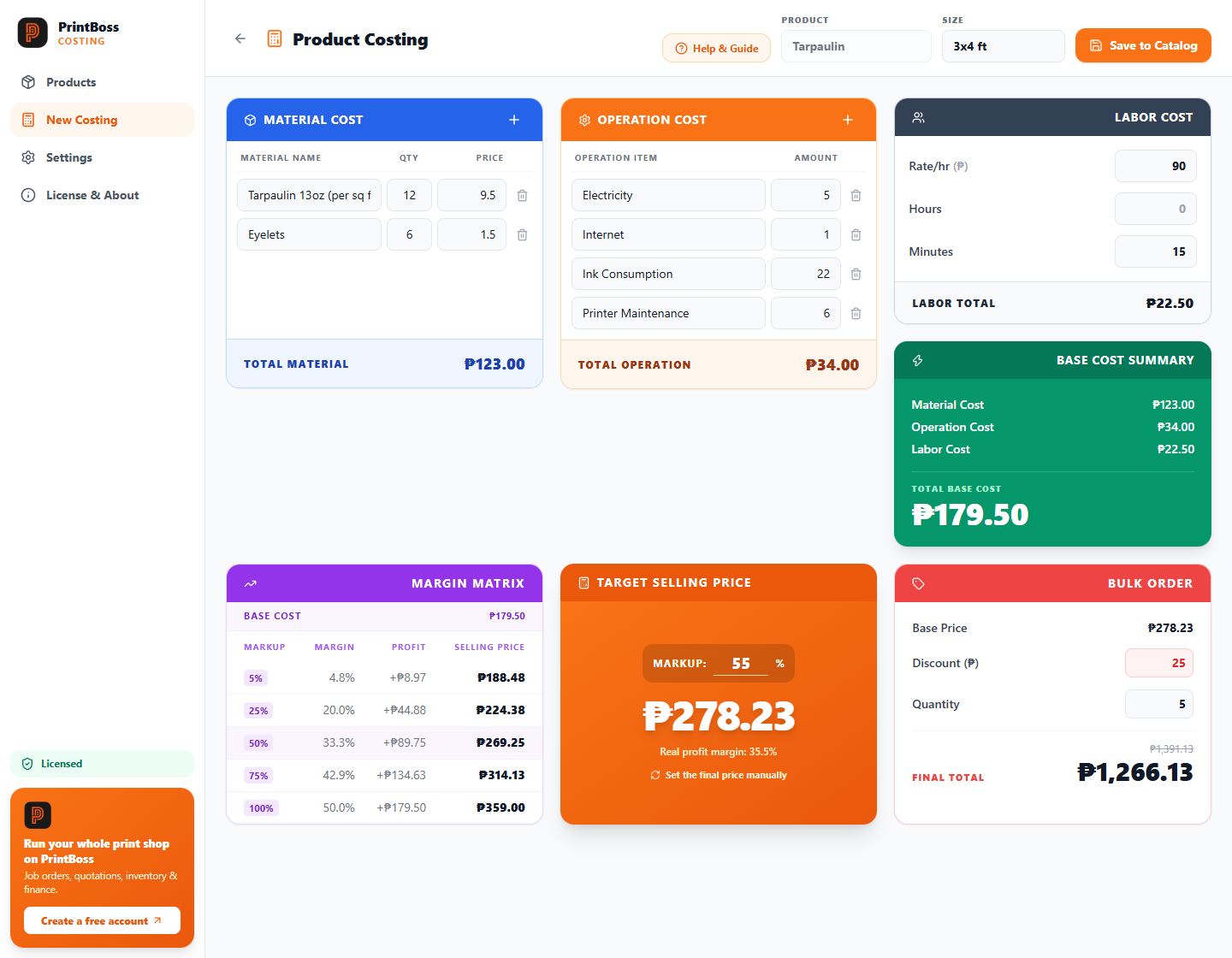
PrintBoss Costing costing screen for a 3x4 ft tarpaulin: material, operation and labor cost, total base cost, a margin matrix, the target selling price and a bulk order total.
  • Works without internet
  • Your data stays on your PC
  • Free version, no time limit
  • Built-in guide in English and Taglish

Everything you need to price a job correctly

No more guessing, no more selling below cost. Enter what a job really costs and see the price that gives you the profit you want.

True base cost

Add materials, operating costs (ink, electricity, maintenance) and labor time. See your exact break-even price, so you never sell at a loss.

Margin matrix

Compare selling prices at 5%, 25%, 50%, 75% and 100% markup, with your real profit margin shown. Or simply type your own final price.

Sizes and variations

Save every size of a product (2x3, 3x4, 4x6 ft) and edit the costs any time a material price changes.

Bulk orders

Enter a per-piece discount and the quantity to get the customer’s total instantly, before you quote.

Customer price list

Make a clean price list with your shop name and logo. It shows selling prices only, never your costs or margins.

Automatic backups

Your products are backed up every day and when you close the app. Restore any of the last 7 days in a click.

English and Taglish

A step-by-step guide is built in, in English and Taglish, so anyone on your team can use it.

Works offline

No internet needed to calculate, save or print. Everything is stored on your own computer.

All your products and sizes in one place

Search your catalog, reopen any size, change a material price and see the new selling price at once. Duplicate a size in one click to price the next one.

  • Edit any product again whenever prices change
  • See cost, margin and selling price side by side
  • Export to a spreadsheet or print a price list PDF
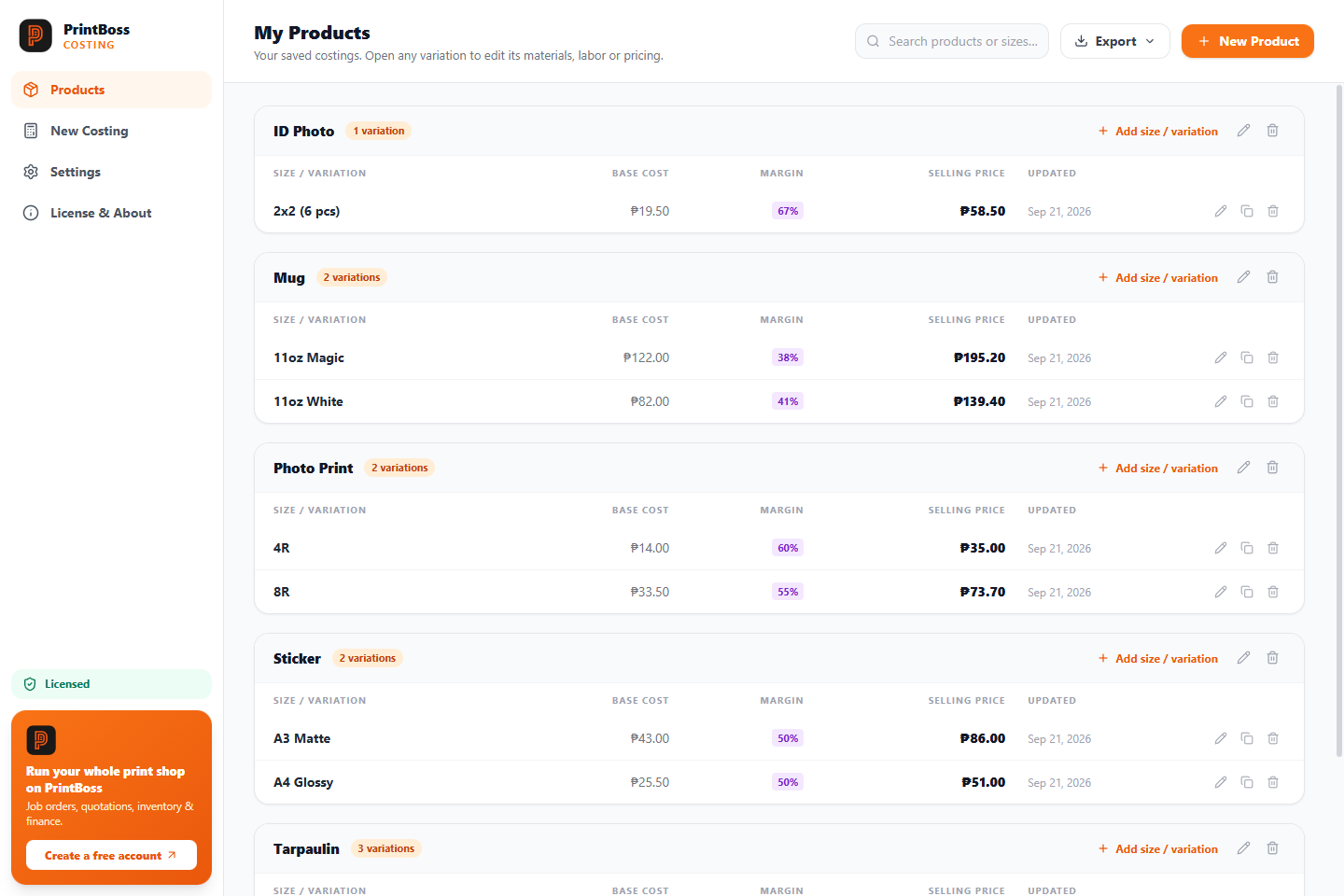
The product list showing ID photo, mug, photo print, sticker and tarpaulin sizes with their base cost, margin and selling price.
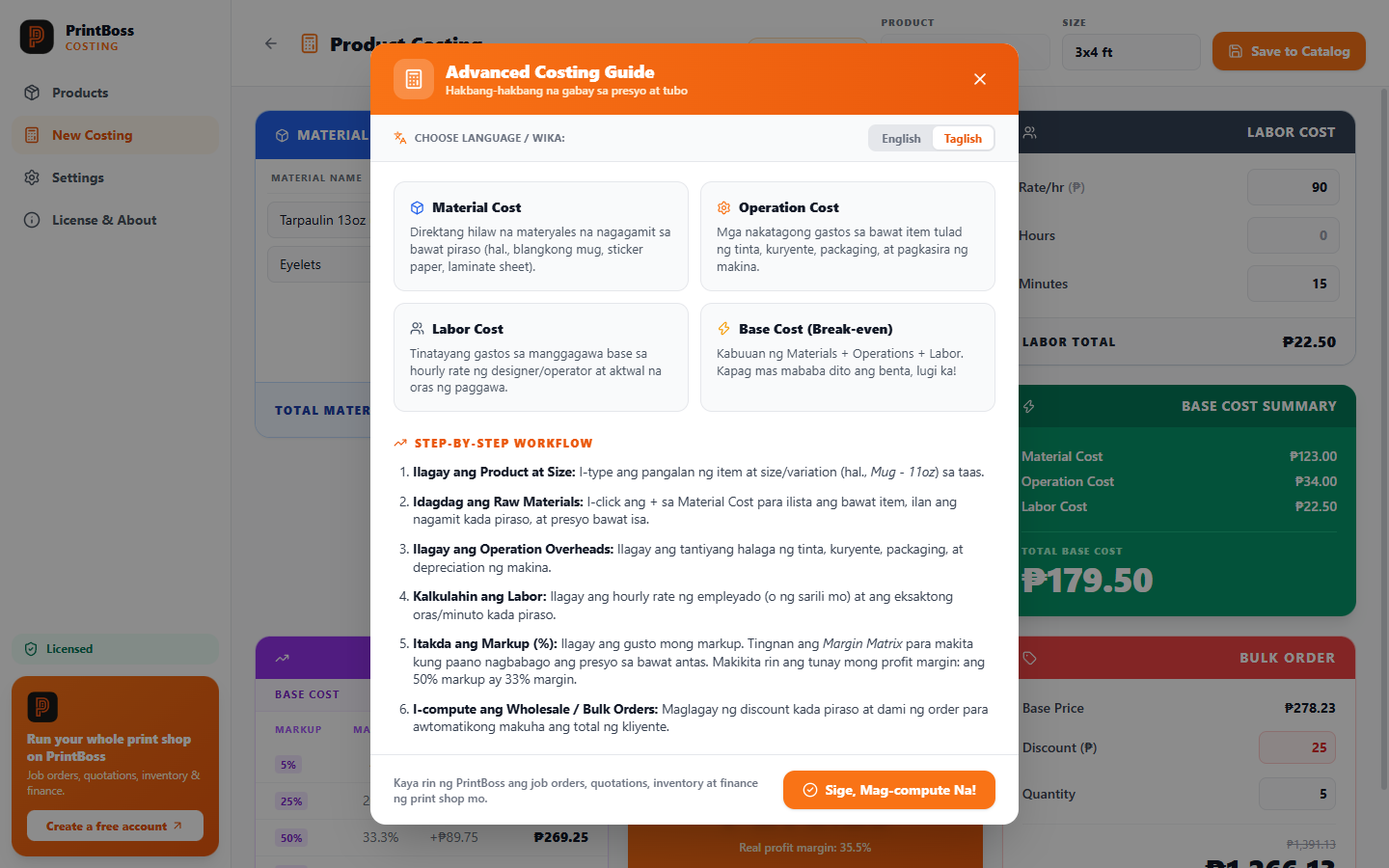
The built-in Taglish guide explaining material cost, operation cost, labor cost and base cost, with a step-by-step workflow.

A guide that speaks your language

New to costing? The built-in guide walks you through it in plain English or Taglish: what to count, how to set your markup, and how to price a bulk order.

  • Materials, operations and labor explained with examples
  • Shows your real profit margin, not just the markup
  • Round prices up to the nearest ₱1, ₱5 or ₱10

How it works

From a blank screen to a confident price in three steps.

  1. Enter what the job costsList the materials, your operating costs and how long it takes.
  2. Choose your markupSee the selling price at every markup level, and the profit you keep.
  3. Save and shareKeep it in your catalog and hand customers a clean price list.

Free to start. Pay once to unlock everything.

Try the whole calculator for free. When you need more products, one payment unlocks unlimited, with no subscription.

Free

₱0free forever
  • Every calculator feature
  • Up to 3 products (with any number of sizes)
  • Keep editing what you saved
  • Price list PDF, backups, Taglish guide

Pay by GCash, Maya or bank transfer. We send your license key as soon as we confirm your payment. Refunds within 7 days: see the terms.

How to buy

Pay ₱120 by QR or GCash, message us your reference number, and we send your license key as soon as we confirm your payment.

Pay by QR or GCash

Payment QR code for Jen Carlo MaglaqueSave the QR image

Jen Carlo Maglaque

0975 813 1700

Scan the QR with GCash, Maya or your bank app, or send to this GCash number. On your phone, save the QR image and choose Upload QR in your app. Check that the name shown matches before you confirm, then message us your reference number.

Contact and support

Jen Carlo Maglaque

0975 813 1700
  1. Pay ₱120 using the payment card: scan the QR or send to the GCash number.
  2. Text or email us your name, shop name and the GCash reference number.
  3. We send your license key as soon as we confirm your payment. Paste it in the app under License & About.

Prefer Maya or bank transfer? Ask and we will send the details. Email: appprintboss@gmail.com

Download and install

Version 1.0.0 for Windows 10 or 11 (64-bit), 93 MB.

Windows says “protected your PC”?

That notice appears for apps from smaller publishers that Windows hasn’t seen often yet. It is normal here. To continue:

  1. Open the file you downloaded.
  2. On the blue window, click More info.
  3. Click Run anyway, then follow the installer.

Want to check the file first?

Compare its SHA-256 fingerprint with ours. In PowerShell, from your Downloads folder:

Get-FileHash .\PrintBoss-Costing-Setup-1.0.0.exe -Algorithm SHA256

It should print exactly:

7c52bec75086190ed30077c8c65f2d4c3b740b0f7d26da60799d87d49c6e9d5f

Questions

Do I need internet to use it?

No. Calculating, saving and printing all work offline. Internet is only used once to activate a license (or never, if you activate offline with a code from us) and for a small license check about once a day when you happen to be online.

What is the difference between free and the full version?

The free version has every feature but keeps up to 3 products (each can have many sizes). The full version removes that limit. Nothing you saved in the free version is lost when you upgrade.

How many computers can I use it on?

A license works on up to 2 PCs. Bought a new computer? Email us and we will move it for you.

How do I buy?

Pay ₱120 by scanning the QR in the “How to buy” section or by GCash to Jen Carlo Maglaque at 0975 813 1700 (or ask us about Maya or bank transfer), then text or email us the reference number. We send you a license key as soon as we confirm your payment. In the app, open License & About, paste the key and click Activate. No internet on that PC? Choose “Activate offline”, send us the machine code shown there, and we send back an activation code.

Where is my data stored?

On your own computer, in %APPDATA%\PrintBoss Costing, with daily backups in Documents\PrintBoss Costing Backups. We never see your products or prices.

Do I need a PrintBoss account?

No. PrintBoss Costing works on its own. PrintBoss is our full print shop system (job orders, quotations, inventory and finance) at https://printboss.pro, if you ever want more.

Can I get a refund?

Yes, within 7 days if it doesn’t work for you. See the terms.

Is it safe?

There are no third-party ads, no tracking and no hidden accounts. You can verify your download with the checksum above. Read exactly what data is involved in our privacy notice.

Try it on your next job

Download it free, cost one real product, and see what your price should be.